When it comes to Image SEO, you’ve probably seen dozens of basic and even advanced guides. Most of them tell you the same things: reduce image size, switch to WebP format, and add alt text.
Yes, those steps matter — but that’s just the surface.
Behind the scenes, big digital agencies use lesser-known secret image optimization tricks that make their clients’ websites perform much better in Google’s image search results. These strategies help turn ordinary images into high-performing traffic assets.
In this detailed guide, we’ll go beyond the basics and uncover these agency-level Image SEO secrets — and explain exactly how you can apply them to your own site.
Table of Contents
Why Secret Image SEO Matters More Than Ever
The internet is increasingly visual. People search not only with words but also with images. Google Images alone drives billions of visits each month, yet most site owners overlook it.
When your images are optimized properly, they can:
- Appear in Google’s image carousel at the top of results.
- Drive direct image search traffic to your site.
- Improve your overall page SEO by boosting relevance and user engagement.
Unfortunately, many businesses just upload stock images, add minimal alt text, and call it a day — missing out on massive potential.
Let’s change that.
1. Use Image-Type Structured Data (Schema)
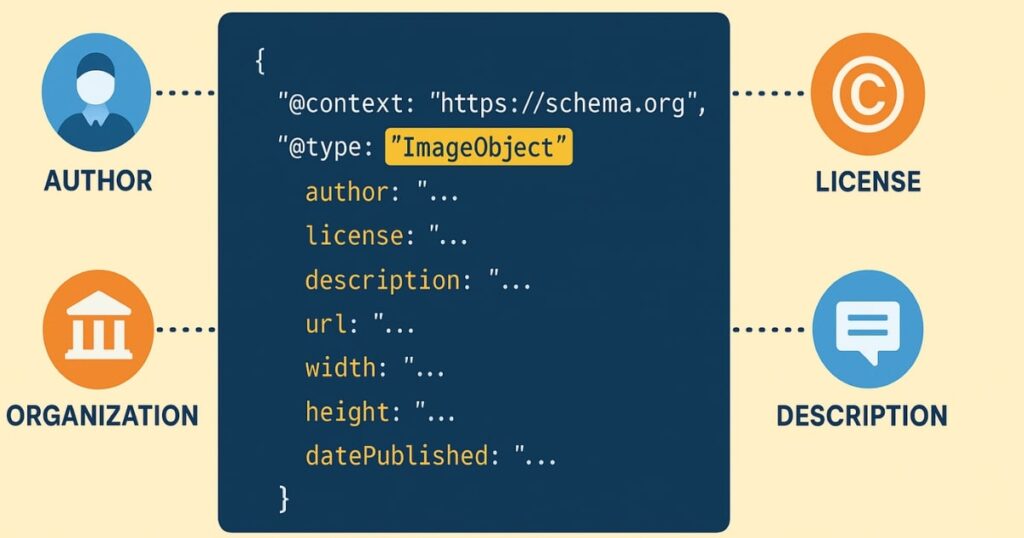
You’ve probably implemented structured data for your products, videos, local business, or reviews. But have you ever used ImageObject schema for your images?
This is a hidden gem. While many SEO plugins make adding schema for products and videos easy, almost none provide image-specific schema out of the box. That’s why most websites skip it.
Here’s why it matters:
When you provide image-specific structured data, Google gets richer information — such as the image’s author, license, content description, and organization name. This extra context can help your image appear in featured image placements at the very top of search results.
How to add it:
- Custom-coded site: Ask your developer to insert an
ImageObjectschema following Google’s structured data guidelines. - WordPress site: Use a plugin like Rank Math to add a custom schema for images.
If your images are original, also claim image licensing to protect your work and establish authority. Even if image theft isn’t your main concern, licensing data signals to Google that your visuals are valuable and authentic.
2. Never Forget the Basics
While these secret tricks are powerful, they won’t work if your Image SEO basics are weak. If you’re skipping fundamentals like:
- Adding alt attributes
- Compressing images for fast loading
- Using custom dimensions instead of oversized files
… then advanced techniques won’t save you.
If you’re short on time, consider using a set-and-forget optimization plugin like AirLift. Once activated, it automatically applies tailored optimizations for your site’s structure, plugins, and design — with no manual settings required. You can track before-and-after image load speeds right in its dashboard.
3. Surround Images with Relevant Text
One of the most overlooked ranking factors is the text surrounding an image.
Google looks at nearby words to understand what an image is about. If your surrounding text doesn’t relate to the image, it’s a missed opportunity — and can even confuse search engines.
For example:
If your homepage section talks about your company’s history, and you randomly drop a GIF of a dancing cat, it makes no contextual sense.
Instead:
- Always introduce the image in the text above or beside it.
- If the image is of a person, mention their name, role, or story.
- Avoid “orphan images” with zero textual explanation.
Think of it as writing a mini-introduction for every image so Google knows exactly why it’s there.
4. Create Custom Images — Stop Relying on Stock
Stock image subscriptions have become cheap and widespread. Platforms like Freepik or Unsplash make it tempting to use ready-made visuals. But here’s the catch:
When you use a stock image, hundreds or even thousands of other sites might be using it too. This hurts both uniqueness and ranking potential.
Instead:
- Take your own photos whenever possible.
- Customize images with your brand colors, graphics, or overlays.
- For eCommerce, avoid using manufacturer-supplied product images — shoot your own to avoid indexing conflicts.
Uniqueness is a huge signal to Google. Custom visuals also feel more trustworthy to visitors, which can increase conversions.
5. Plan for Mobile First

Most designers choose images based on how they look on desktop — usually in landscape mode. But here’s the problem:
On mobile, that same image may shrink so much that important details (like a person’s face) become tiny or unreadable.
To fix this:
- Use square or portrait images where possible for mobile sections.
- Consider serving different versions of the same image for desktop and mobile.
- Always preview your site on multiple screen sizes before publishing.
If the most important part of your image isn’t clearly visible on a phone, you’re losing mobile engagement — and mobile now accounts for the majority of web traffic.
6. Avoid Too Much Text Inside Images
Adding text directly into an image can create SEO headaches:
- Google can’t always read text inside images.
- If you repeat the same text in your HTML content, it creates duplicate content signals.
If you must use text inside an image (like for an infographic):
- Make sure that text isn’t repeated verbatim in your page copy.
- Instead, use your surrounding content to explain or expand on the infographic.
This approach keeps your content fresh, avoids redundancy, and helps search engines understand the value of the image.
7. Align Images Strategically
Why do we use images in the first place? To break up walls of text and give the reader’s eyes a rest. But if every image is aligned exactly the same way — center, center, center — it becomes predictable and boring.
Instead:
- Alternate alignments: left, right, center in a flowing pattern.
- Ensure the placement feels natural with the text flow.
- Keep both desktop and mobile layouts in mind.
A visually engaging image layout can improve user experience, which indirectly boosts SEO.
Agency-Level Summary
These strategies aren’t just theory — they’re exactly what big SEO agencies implement for their clients:
- Adding ImageObject schema to give Google richer context.
- Maintaining basic optimization alongside advanced tricks.
- Writing contextual text around every image.
- Prioritizing custom visuals over generic stock.
- Designing for mobile from the start.
- Limiting text in images to avoid duplication issues.
- Keeping image alignment dynamic to sustain engagement.
Most importantly: they don’t advertise these methods, because they’re part of what sets them apart in delivering results.
Final Thoughts
Next time you visit a well-designed website and feel satisfied by its flow, chances are these principles are at work. But because they’re rarely taught in “standard” SEO guides, most site owners never apply them.
Now you have them.
Go through your site page by page, check each image, and apply these strategies. Even small tweaks — like adding schema or changing an alignment — can give your images the boost they need to drive more traffic and improve your SEO.
FAQs
1. What is ImageObject schema, and why should I use it?
ImageObject schema is a type of structured data that gives search engines detailed information about an image. Using it can help your images appear in rich results and improve visibility.
2. Do I need both basic and advanced Image SEO techniques?
Yes. Advanced methods only work well if you’ve already optimized file size, alt text, and dimensions.
3. Can I still use stock images for SEO?
You can, but custom or branded images generally rank better because they are unique and provide more value.
4. How do I make my images mobile-friendly?
Use square or portrait orientations for important visuals, and consider serving separate desktop and mobile versions.
5. Why shouldn’t I put too much text inside images?
It can cause duplication issues if repeated in your page copy, and search engines can’t always read image-embedded text.
6. Does image alignment really affect SEO?
Indirectly, yes. Better alignment improves user experience, which can reduce bounce rates and improve rankings.
7. Which plugin can automate Image SEO basics?
Tools like AirLift can automatically handle compression, sizing, and speed optimization without manual settings.